Jobber Review (2026)
This Jobber review covers connected customer requests, quotes, schedules and invoices for cleaning businesses.
Best Suited to Cleaning Businesses That Quote Work Before Scheduling It.
- Best for
- You assess inquiries and agree quotes before arranging the work, with customers using a hub for documents and appointments.
- Main trade-off
- Budget for the required plan and team logins. Compare other options if customers must book ongoing service every week or every two weeks themselves.
$199/moConnect · 5 users · flexible billing
USD; tax, processing and add-ons extra. Published bundle, not a minimum quote. Plan details ↓ · Jobber pricing and plans
Published prices checked October 13, 2026.
Direct vendor link; no affiliate relationship asserted.
Review basis and limitations
Grow-labeled trial, independent cleaner/customer sessions; live payments and native apps untested. Existing trial observations and published documentation; see review method. Trial access does not establish permanent paid-plan entitlement. These findings support the assessment; they do not establish every advertised capability. Selected trial screenshots appear beside the relevant findings. Original account captures are retained privately; official sources are linked where used.
Full review method and sources ↓What Is Jobber?
Jobber connects the main records involved in delivering a service. A customer has contact details and properties; an inquiry can lead to a quote or job; a job contains scheduled visits; cleaners receive assignments; completed work can lead to an invoice. The customer hub gives customers a separate view of relevant appointments and documents.
For customers, forms and the customer hub connect requests, appointments and documents. For the office, customer properties, quotes, jobs and invoices provide a connected service record. For cleaners, assignments, notes and checklists carry job instructions into the field.
Jobber also documents accounting integrations, automated communications, routing and payment collection. Those capabilities have different plan and setup requirements. We inspected parts of them, but did not verify accounting synchronization, routing accuracy, automatic reminder delivery or live payments. Feature access in the Grow-labeled trial is not proof that a cheaper paid plan includes it. Jobber plans, checked October 8–9, 2026.
| Demonstrated strength | Practical limitation |
|---|---|
| Recurring visits with individual exceptions | Public booking produced one-time work in the tested flow |
| Customer appointment, quote-change and invoice views | Payment collection and customer quote signing were not executed |
Who Is Jobber Best Suited To?
Jobber suits an owner or office manager coordinating a small team, especially when customers need quotes, schedule changes and invoices as well as a calendar. Its connected records are useful when a cleaner changes or a regular customer needs an exceptional appointment.
It deserves a closer trial if you want customers to see their next visit and request quote changes without relying entirely on email. The independent customer-hub tests verified those specific handoffs.
Jobber Pricing and Team Costs
Count everyone who needs a login, including an office owner. A cleaning owner working alone is different from an owner plus one employed cleaner. The trial admitted extra test users, but that does not establish a paid subscription allowance.
Published USD prices rechecked October 13, 2026 give these selected flexible monthly bundles. Trial-account observations elsewhere retain their original October 8–9 dates:
| Plan | One user | Five users | Ten users |
|---|---|---|---|
| Core | $49 | — | — |
| Connect | $139 | $199 | $299 |
| Grow | $199 | $299 | $399 |
These are no-commitment monthly prices, excluding tax, processing and add-ons. For comparison, the one-user annual-prepaid equivalents were $29 for Core, $99 for Connect and $149 for Grow per month. Annual equivalence is not a cancellable monthly subscription; a separate 12-month monthly commitment option also existed. Official pricing, rechecked October 13, 2026.
The following team examples use published user bundles on flexible monthly billing. Count one owner plus every cleaner who needs access. They are bundle illustrations; account-specific extra-seat offers can change your final quote.
| Cleaners + one owner | Required logins | Connect / month | Grow / month |
|---|---|---|---|
| 1 + owner | 2 | $199 | $299 |
| 3 + owner | 4 | $199 | $299 |
| 5 + owner | 6 | $299 | $399 |
| 10 + owner | 11 | $399 | $499 |
The five-, ten- and fifteen-user bands provide clear reference costs for these teams. Match the plan’s features to your work before comparing the subscription total; a larger allowance alone is not a reason to upgrade.
Ask Jobber for a quote if extra-seat eligibility could fit your team better than the published bundle. This review does not apply a historical account-specific seat fee to every buyer.
Plan choice depends on workflow as well as headcount. Core documentation describes the baseline customer, job and invoice tools. Connect documents checklists, time/expenses, automated notifications and accounting capabilities; Grow adds capabilities such as advanced quotes and custom automations. Confirm the current feature row and user allowance for your account: this review tested a trial, not each paid tier. Core, Connect and Grow, checked October 8.
Jobber advertised a 14-day Grow trial without a card. Two-way texting was excluded from trial, and add-on access was restricted; the exact account expiry timestamp remained unknown. Trial pricing and texting FAQ, checked October 8–9.
Payment setup displayed US fees of 2.9% + 30¢ for cards and 1% for ACH, with separate tap/card-reader and instant-payout rates. These were setup-screen findings, not processed transactions or a complete fee quote. Identity and bank verification were not completed. Confirm the current payment terms and rates before budgeting collection costs.
How Jobber Handles the Work
Recurring Cleaning and Schedule Changes
Jobber organizes recurring work as jobs containing scheduled visits. The office can maintain service every week or every two weeks, move an individual visit and reassign unfinished work when a cleaner changes.
Our checks retained individual scheduling exceptions during later changes and reconciled a first-visit extra with an invoice draft. Pausing service needs care: reopening a job whose future visits were removed did not recreate those appointments. Check the calendar when a customer returns.
Supporting tests and evidence
Yes: office-created weekly and every-two-week schedules worked in the trial. We also tested the changes that matter after a repeat customer is established.
A weekly job contained a normal service and an oven-cleaning extra applied to the first visit only. The first visit total was $103.20: $87.20 for the regular service plus $16 for the extra. The next visit excluded the extra, and the first invoice draft reconciled to $103.20. These are sample customer charges, unrelated to Jobber’s subscription price.
An isolated appointment change was checked separately from a future-series change. The saved calendar reflected the different visit times; the tested earlier exception survived later work on the series. That is useful when a regular customer needs one different arrival time without changing their entire pattern.
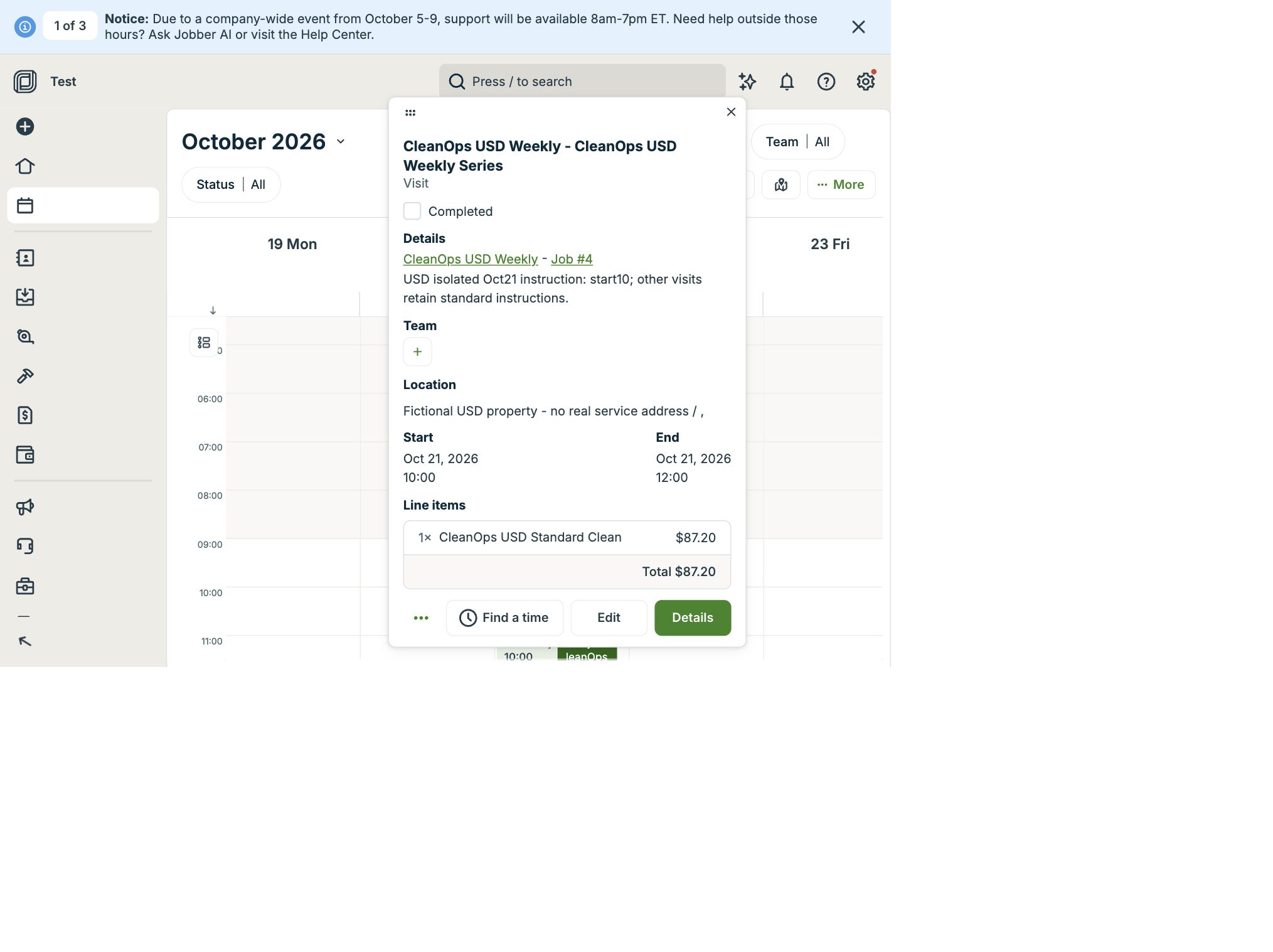
Cleaner handoff also worked at a defined scope. One visit was assigned individually, then all incomplete visits were assigned to a second cleaner. Previously completed work retained its prior assignment, while incomplete visits retained their different times and instructions. This was an all-incomplete-visits change, not proof of every possible “from this date onward” assignment action.
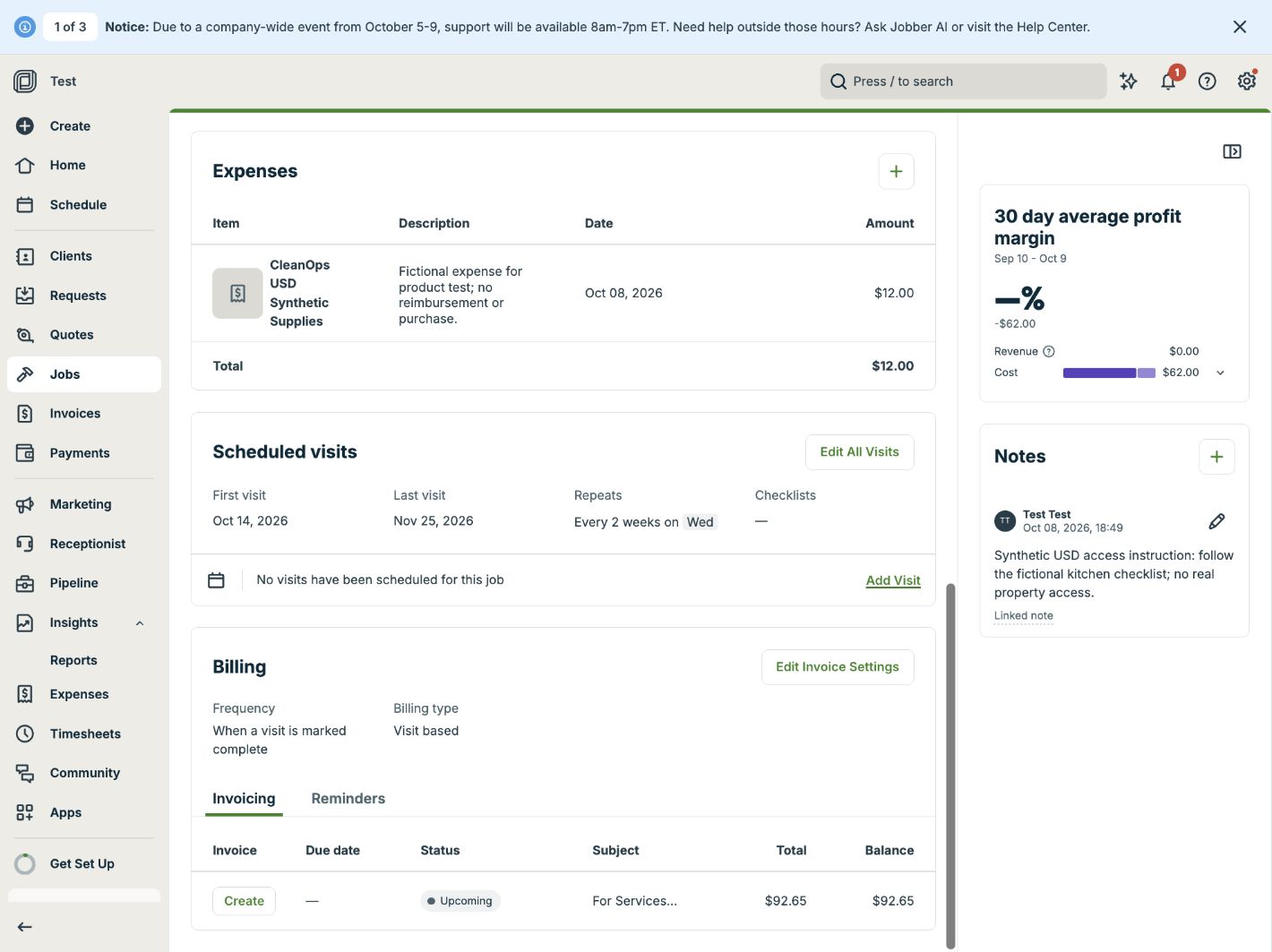
Cancellation needs deliberate handling. We permanently removed one every two weeks occurrence and confirmed that other visits remained. Closing the job with its future visits removed worked too. Reopening that job did not recreate the removed appointments: it returned with no scheduled visits. If a customer pauses and returns, check the actual calendar rather than assuming Reopen restores their old schedule.
Online Booking and Recurring-Service Setup
Jobber’s online booking lets a customer select a priced service and an available appointment, creating connected customer, property and job records. This provides a customer entry point alongside the office’s request-and-quote workflow.
The tested public flow created a one-time clean, not a every week or every two weeks subscription. Office-created recurring service worked separately. If your business sells ongoing cleaning online, decide how the office will establish repeat work and carry forward pricing and instructions; do not assume the one-time booking form completes that journey.
Supporting tests and evidence
The tested booking form booked a one-time clean, not a recurring series. A customer selected a $109, two-hour service, chose a slot and confirmed it. The office then contained the new customer, property, instructions, assigned team member and one-time job.
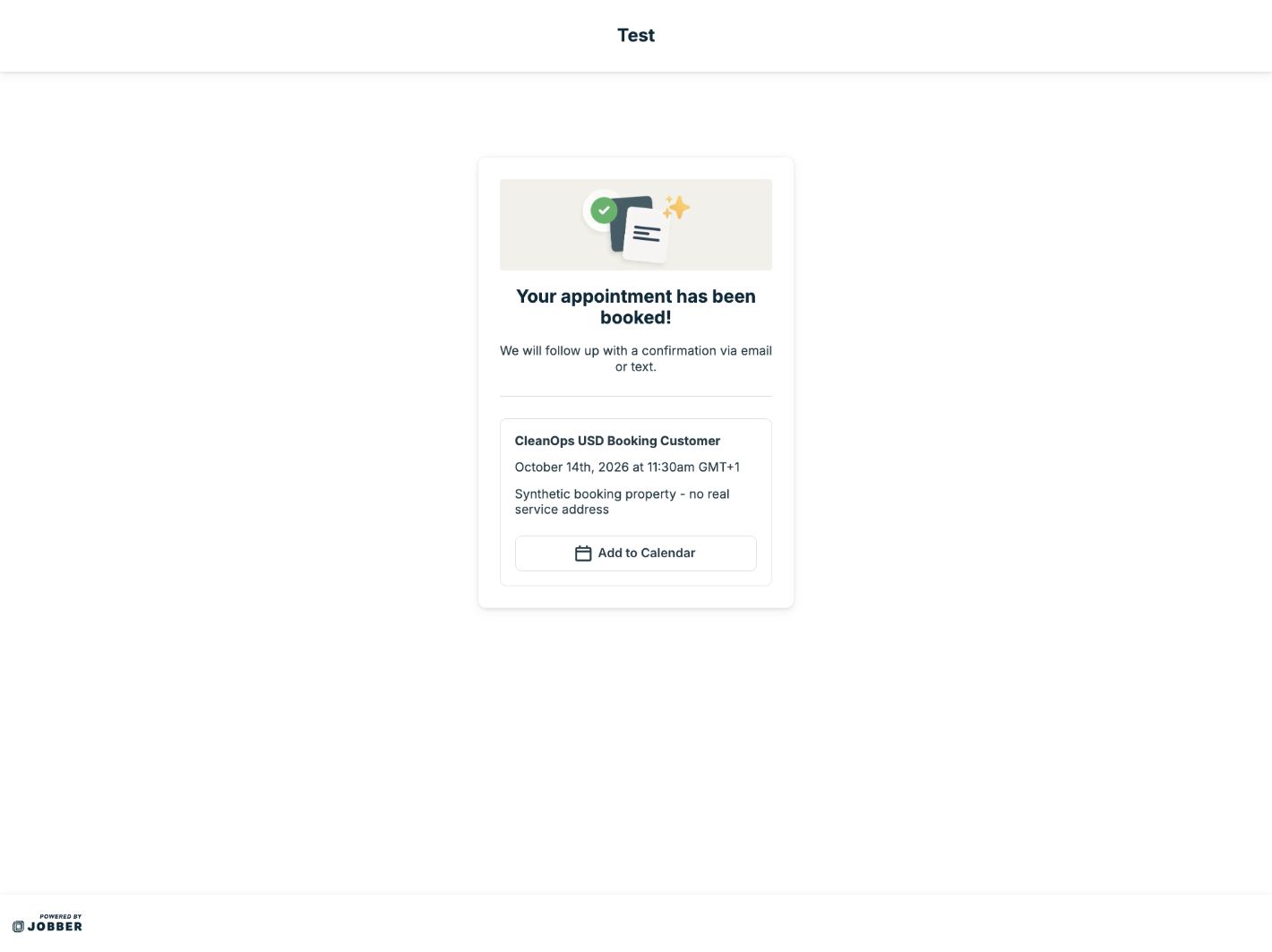
The tested slot choices were consistent with an existing timed task and a 30-minute buffer. That supports this configured booking example, not a universal claim that every kind of clash is prevented. Jobber’s online-booking documentation, checked October 9, describes job booking as creating a one-off job.
No recurring-frequency selector appeared in that public flow or the booking controls inspected. On the owner side, the tested existing job’s details and More menu did not offer an in-place recurring conversion. Create Similar Job exposed a separate new-job form with recurring options, but that copy was not saved. Office-created recurring work was tested independently.
For a cleaning company, the implication is a handoff: decide who turns a new one-time booking into ongoing service, and confirm how the original customer, pricing and notes are carried forward. Do not advertise a self-service recurring booking journey on the basis of this review.
Inquiry capture also needs a realistic duplicate-record test. Submitting an existing email matched the existing customer, and the submitted contact name did not create a distinct customer identity. That can be useful for returning customers, but an importer or shared household email deserves checking before migration.
Cleaner Assignments and Completion Controls
Jobber gives field staff access to scheduled work, instructions, notes and checklists. These tools help the office hand over a clean and record what was done. Feature availability depends on the plan and staff permissions.
Use the plan’s checklists and job instructions to standardize what the office hands to cleaners. Configure permissions for the roles you use, and decide whether checklist completion is a recording step or a required gate in your process. Comprehensive access boundaries, overlap prevention and completion enforcement were outside this evaluation.
Customer Communications and Documents
Jobber connects the office workflow with a customer hub for appointment information, quote changes and invoices. Customers can view relevant documents and communicate a requested quote change without keeping every detail in a separate email thread.
Independent customer checks confirmed those specific views and the quote-change handoff. The owner confirmed receipt of a booking confirmation and a rescheduling message. Scheduled-reminder delivery remains unresolved: the controlled attempt did not produce a visible history entry by the final check. That is a trial check to complete, rather than evidence of a permanent product failure.
Supporting tests and evidence
The strongest evidence is for manual communications and saved customer documents. After account email verification, a booking confirmation was sent to the authorized test inbox; the owner confirmed receipt. A calendar reschedule prompted an optional email notice, and the updated appointment appeared in the communication record and customer hub. Receipt of that rescheduling message was also confirmed. Directly editing the visit had not displayed the same email prompt in the tested route.
Automatic delivery remains less certain. A later inquiry produced a “Thanks for your request!” Sent record, but its inbox receipt was not confirmed; an earlier custom-form acknowledgement was not received at the user’s check. A controlled scheduled-reminder attempt produced no visible reminder-history entry by the final check. This does not demonstrate a permanent failure or explain its cause. Automatic reminders should remain a trial acceptance test, not a verified strength of this review.
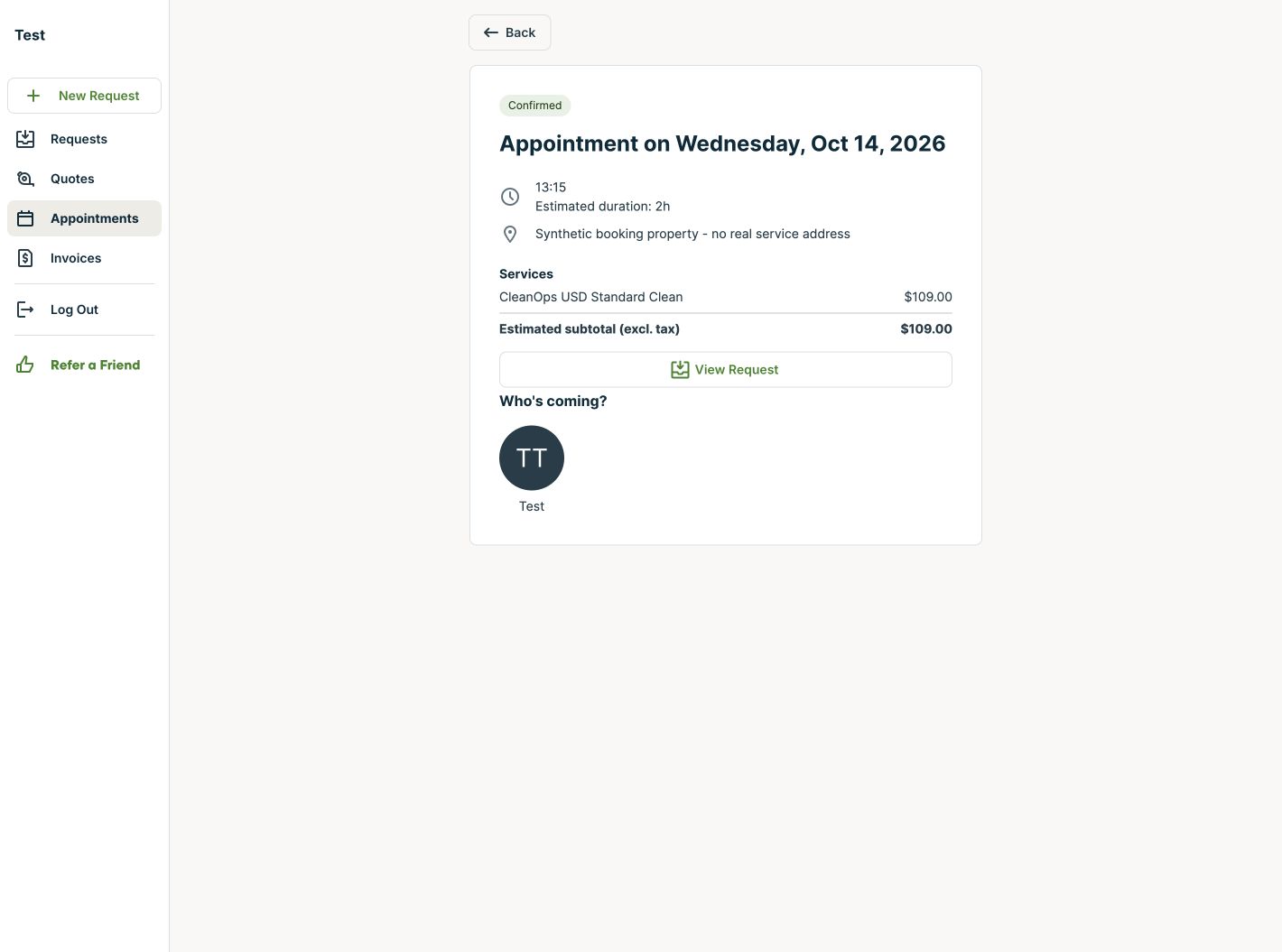
The independent customer hub showed the rescheduled $109 appointment and assigned team member. A customer quote change request persisted in the owner account as Changes requested, with the exact comment. An issued $109 invoice appeared in the customer account and owner balance. We did not approve or sign a quote as a customer, pay the invoice or test refunds.
Invoicing, Costing and Reports
Jobber connects customer documents with invoicing and provides costing and reporting views for recorded labor and expenses. This is a reason to examine it when the office needs more than a cleaning calendar.
An issued sample invoice appeared in both the customer account and owner balance; the recurring-work test also reconciled a first invoice draft. Sample labor and expense entries persisted in costing views. Live payments and refunds were not tested, and those records do not establish actual business profit.
Supporting costing and report checks
Time, expenses and reports were also inspected. A sample $50 labor cost and $12 expense persisted into the costing views, and relevant report records were checked. Those entries demonstrate record handling, not actual profitability. A one-customer CSV export was queued, but the emailed file contents were not verified. Import could not be completed through the supported file chooser in this test environment; that is an unresolved migration test, not proof Jobber cannot import.
Limitations and Checks Before Switching
Migration, Integrations and Routing
Moving to Jobber involves more than recreating appointments: customer records and accounting requirements need to fit the new system. Its documented integrations, routing and automation options extend the connected office workflow, with plan and setup requirements.
A small customer import, downloaded export and working accounting connection were not verified in this evaluation. Treat those as implementation checks if they affect your decision. Routing accuracy and savings were also not established from fictional addresses.
Supporting tests and evidence
The biggest unresolved implementation question is migration. Complete a small customer import and open the exported CSV before moving real records. Check duplicate emails, multiple properties, consent fields and your own bookkeeping requirements.
Accounting listings and documentation do not establish a working sync. QuickBooks, Xero, Zapier and payroll connections were not executed against authorized external accounts. Likewise, a routing screen with fictional addresses cannot establish travel accuracy or savings. A custom automation builder was inspected without activating a live rule. Keep these outside any promised benefits until your trial verifies them.
Support and Onboarding Questions
Make support part of your switching plan. Ask how the vendor handles migration questions, account recovery and access to exports before moving your customer book.
This evaluation does not rate response times, uptime or typical customer satisfaction. A useful next step is a specific setup question about your service and team, rather than relying on a general testimonial.
Jobber Alternatives
Consider BookingKoala when customers should choose ongoing cleaning frequency and extras online. Its separate tests covered frequency-based prices, recurring bookings and the office-to-cleaner handoff. Pricing setup and plan restrictions are important trade-offs. Read the private BookingKoala review.
Compare equivalent plans and the customer entry point your business needs. These reviews do not establish an overall usability winner.
Our Verdict on Jobber
Jobber deserves a shortlist place when you assess a property, agree a quote and then organize the clean. Requests, quotes, appointments and invoices stay connected, while the customer hub gives customers a place to revisit documents and visit details.
Compare BookingKoala if customers should choose a standard clean and start repeat service through your website. Jobber’s tested public booking flow created one-time work; the office arranged recurring jobs separately.
For an owner plus three cleaners who each need a login, the published Connect five-user bundle is $199 on flexible monthly billing. It is a useful reference when checklists and reminders are required; Grow adds job costing and two-way SMS. Different seat arrangements may produce a different quote.
The buying decision is whether your office benefits from linking the agreed scope, customer documents and scheduled visits. Keep migration and payment setup in your rollout plan; neither was verified end to end in this review.
Compare the required plan with the way you book, assign and bill for cleaning work.
How We Tested Jobber
This Jobber review used made-up customer records, test bookings and sample cleaning prices. No real cleaning took place, and no customer payments were processed. The authorized account was a Grow-labeled trial; current scenarios used USD. Its actual timezone was Europe/London, so appointment times were checked as account-local times, not assumed to be US times.
The principal limits are automatic reminder delivery, complete CSV import/export, external integration sync, route accuracy, paid-plan entitlement and live payment processing. Mobile evidence is browser testing, including a 390 × 844 viewport; it does not assess Jobber’s native apps. We did not measure task speed, support quality, uptime, revenue or business savings.
Evidence scope: the review retains the documented customer-hub, appointment and office-record observations. Comprehensive access boundaries, overlap prevention and mandatory-checklist enforcement were not established and do not determine the recommendation. We make no comparative security or billing-reliability claim.